
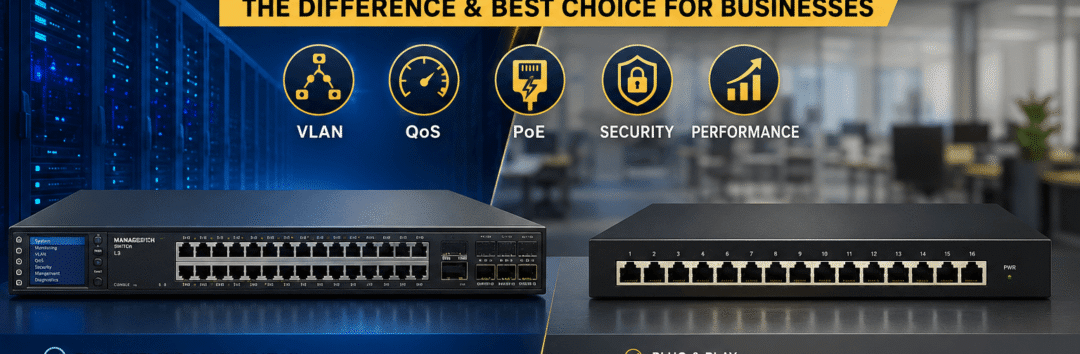
Managed Switch vs Unmanaged Switch
Enterprise NetworkingWhat is a Managed Switch؟
يعتبر Managed Switch الخيار الاحترافي المستخدم داخل الشركات والفنادق والمصانع والمستشفيات ومراكز البيانات، لأنه يمنح مسؤول الشبكة تحكمًا كاملاً في جميع المنافذ وإدارة حركة البيانات ومراقبة الأداء وحل المشكلات قبل أن تؤثر على المستخدمين.
أهم مميزات Managed Switch
VLAN
تقسيم الشبكة إلى عدة شبكات مستقلة لتحسين الأداء والأمان.
QoS
إعطاء الأولوية لتطبيقات VoIP والاجتماعات وكاميرات IP.
Port Management
إدارة كل منفذ ومراقبة استهلاك البيانات وإيقاف أي منفذ عند الحاجة.
SNMP Monitoring
مراقبة الشبكة بالكامل واكتشاف الأعطال مبكرًا.
Link Aggregation
زيادة سرعة الربط بين السويتشات والسيرفرات.
Security
تطبيق سياسات أمنية تمنع الوصول غير المصرح به.
هل تخطط لإنشاء شبكة احترافية؟
يقوم فريق AY Technology بتصميم وتنفيذ شبكات LAN للشركات والفنادق باستخدام أحدث حلول Cisco وGrandstream وMikroTik وAruba مع دعم كامل لأنظمة Fiber Optic وWiFi Enterprise.
مقالات مرتبطة
What is an Unmanaged Switch?
يعتبر Unmanaged Switch أبسط أنواع السويتشات، حيث يعمل مباشرة بمجرد توصيل الكهرباء وكابلات الشبكة دون الحاجة إلى أي إعدادات أو برمجة، لذلك يعرف باسم Plug & Play Switch.ويستخدم غالبًا داخل المنازل أو المكاتب الصغيرة التي لا تحتاج إلى إدارة متقدمة للشبكة.
مميزات Unmanaged Switch
💰 سعر اقتصادي
أقل تكلفة مقارنة بالسويتشات الاحترافية.
⚡ تركيب سريع
لا يحتاج إلى إعدادات أو برمجة.
🏠 مناسب للمنازل
مثالي للشبكات الصغيرة بعدد مستخدمين محدود.
🔌 Plug & Play
يعمل فورًا بمجرد التوصيل.
إذا كانت الشبكة تحتوي على كاميرات IP أو Access Points كثيرة أو VoIP أو تحتاج إلى VLAN أو مراقبة للأداء، فمن الأفضل استخدام Managed Switch.
Managed Switch vs Unmanaged Switch
| Feature | Managed Switch | Unmanaged Switch |
|---|---|---|
| Configuration | ✔ Full Configuration | ✖ Plug & Play |
| VLAN | ✔ Supported | ✖ Not Supported |
| QoS | ✔ Yes | ✖ No |
| SNMP Monitoring | ✔ Yes | ✖ No |
| Enterprise Networks | ⭐⭐⭐⭐⭐ | ⭐⭐ |
| Security | High | Basic |
| Recommended For | Companies - Hotels - Hospitals - Factories | Homes - Small Offices |
متى يجب استخدام Managed Switch؟
إذا كنت تقوم بتنفيذ شبكة احترافية داخل شركة أو فندق أو مصنع أو مستشفى فإن استخدام Managed Switchلم يعد رفاهية، بل أصبح جزءًا أساسيًا من تصميم الشبكة الحديثة.فهو يمنحك إمكانية التحكم الكامل بالشبكة وتحسين الأداء ومراقبة الأعطال قبل أن يشعر بها المستخدم.
🏢 الشركات
إدارة الموظفينVLANأمان أعلىسهولة التوسع
🏨 الفنادق
شبكة للنزلاءشبكة للإدارةكاميراتVoIPWiFi
🏭 المصانع
ربط خطوط الإنتاجالسيرفراتالأجهزة الصناعيةالمراقبة
🏥 المستشفيات
أجهزة طبيةVoIPكاميراتServersأنظمة الإدارة
لماذا تعتمد الشركات على AY Technology؟
يقوم فريق AY Technology بتصميم وتنفيذ شبكات احترافية تعتمد على أحدث حلول Cisco وGrandstream وAruba وMikroTik مع تطبيق أفضل ممارسات Structured Cabling وFiber Optic.
- ✔ تصميم LAN Infrastructure
- ✔ Managed Switch Configuration
- ✔ VLAN Configuration
- ✔ WiFi Enterprise
- ✔ Fiber Optic Solutions
- ✔ Rack Cabinet Installation
- ✔ Structured Cabling
أكمل القراءة
للحصول على أفضل أداء للشبكة ننصح بقراءة الأدلة التالية:
الأسئلة الشائعة حول Managed Switch و Unmanaged Switch
هل Managed Switch يزيد سرعة الإنترنت؟
لا يزيد سرعة خط الإنترنت المتعاقد عليها، لكن إعداد VLAN وQoS وإدارة المنافذ قد يساعد على تقليل الازدحام وتحسين أولوية التطبيقات داخل LAN إذا كان التصميم والمعدات مناسبين.
هل أحتاج Managed Switch مع كاميرات IP؟
إذا كان المشروع يحتوي على عدد كبير من كاميرات IP أو أجهزة NVR وPoE Switch فمن الأفضل استخدام Managed Switch لتسهيل الإدارة وتحسين الأداء.
ما الفرق بين Layer 2 و Layer 3 Switch؟
Layer 2 Switch ينقل إطارات Ethernet باستخدام MAC Addresses، ويدعم VLAN حسب مواصفات الجهاز، لكنه لا ينفذ عادةً Inter-VLAN Routing؛ بينما Layer 3 Switch يضيف إمكانات IP Routing بين شبكات VLAN بحسب الترخيص والإعدادات.
هل يمكن استخدام Fiber Optic مع Managed Switch؟
نعم، معظم السويتشات الاحترافية تدعم منافذ SFP أو SFP+ للربط عبر الألياف الضوئية Fiber Optic لمسافات طويلة وبسرعات عالية.
هل تحتاج إلى تصميم شبكة احترافية لمشروعك؟
يقوم فريق AY Technology بتصميم وتنفيذ شبكات LAN وFiber Optic وWiFi Enterprise باستخدام أحدث حلول Cisco وGrandstream وAruba وMikroTik مع الالتزام بأفضل معايير الأداء والأمان.
خدمات AY Technology ذات الصلة
- LAN Network Solutions
- Structured Cabling Systems
- Fiber Optic Solutions
- Enterprise WiFi Solutions
- IP CCTV Systems
- Server Room Infrastructure
- Rack Cabinets
- Network Maintenance Contracts
Enterprise LAN Design • Practical Switching Guide
Managed vs Unmanaged Network Switch: Which Should Your Business Choose?
Switch selection affects how you segment networks, monitor faults, prioritize traffic and maintain the connectivity used by computers, IP cameras, access control, Wi-Fi and IP telephony. This guide explains the differences, benefits, limitations and practical purchasing decisions for businesses, hotels, factories and other facilities in Egypt.
What Is a Managed Switch?
A managed network switch provides configurable control over its ports and switching behaviour. Depending on the model, it can support VLANs, traffic prioritization, network monitoring, link aggregation, security controls and troubleshooting features. These functions are especially useful in larger LANs and projects that carry multiple types of traffic.
VLAN Segmentation
Separate departments, guest Wi-Fi, security cameras or voice endpoints into distinct logical networks. VLANs require correct router, firewall and switch configuration to enforce the intended network policies.
Quality of Service (QoS)
Classify and prioritize latency-sensitive traffic such as VoIP and video conferencing. Actual results depend on the switch, congestion points and the wider network design.
Port Configuration & Visibility
Enable or disable ports, review link speed and errors, inspect utilization and troubleshoot connected devices. Exact diagnostic features vary between models.
SNMP & Network Monitoring
With supported switches and a monitoring system, administrators can track interfaces, receive alerts and detect infrastructure problems before they affect many users.
Link Aggregation
Combine compatible physical links for aggregate capacity and resilience. Link aggregation does not normally multiply the maximum bandwidth of a single traffic flow.
Network Security Features
Available capabilities may include port security, DHCP snooping, access controls and management authentication. Security requires appropriate configuration and maintenance.
What Is an Unmanaged Switch?
An unmanaged switch is designed for simple plug-and-play connectivity: connect its power and Ethernet cables and it forwards traffic without a configuration interface. It is often suitable for small, uncomplicated networks that do not need detailed segmentation, monitoring or central administration.
Simple Installation
Little or no configuration is needed, making it convenient for a small number of devices at a home or compact office.
Lower Administration Overhead
Without management settings, there is less daily administration, although there are also fewer options for fault isolation and network policy enforcement.
Cost-Effective for Basic Connectivity
Unmanaged models can be economical where advanced management features offer no practical benefit.
Important Limitations
Generally, you cannot configure VLAN membership, inspect detailed port statistics or manage security settings. Some unmanaged models do provide fixed, non-configurable features such as PoE or basic traffic handling.
Managed vs Unmanaged Switch — Comparison
| Feature | Managed Switch | Unmanaged Switch |
|---|---|---|
| Port configuration | Configurable, model-dependent | Generally plug-and-play |
| VLAN segmentation | Often supported and configurable | Usually not configurable |
| QoS policies | Often configurable | May have limited or fixed handling |
| SNMP / management visibility | Available on supported models | Typically unavailable |
| Link aggregation | Available on supported models | Usually unavailable |
| Security controls | Advanced options on supported models | Limited |
| Common use cases | Enterprise LANs, hotels, factories, camera / voice networks | Small basic networks and simple extensions |
| Power over Ethernet | Available on many models | Also available on some models — PoE does not automatically mean managed |
When Is a Managed Switch Worth It?
Consider a managed switch when an installation needs separate VLANs, centralized monitoring, secure administration, multiple access points, voice traffic, numerous IP cameras or fibre uplinks. A properly designed system should also account for port count, switching capacity, PoE budget, uplink speed, redundancy and operating environment.
Offices & Corporate LANs
Separate staff, guests and server systems; manage devices; support VoIP and plan capacity for additional departments.
Hotels & Resorts
Keep guest Wi-Fi, administration, CCTV and IPTV or voice services appropriately segmented while providing network visibility.
Factories & Industrial Facilities
Connect operations, monitoring, servers and industrial endpoints, with suitable environmental specifications and design controls.
Healthcare & Institutional Facilities
Plan secure, reliable connectivity for different departments and equipment, following applicable operational and security requirements.
How to Select a Switch for a Project
- Count the endpoints: Include computers, access points, cameras, phones and expected future devices.
- Calculate the PoE budget: Check both per-port limits and the total available power, where PoE is needed.
- Plan uplinks: Determine whether 1G, 10G or faster links and SFP/SFP+ fibre interfaces are required.
- Define segmentation and controls: List VLANs, ACLs, management access, monitoring and redundancy requirements.
- Check compatibility: Validate transceiver types, standards, software support, licensing and interoperability.
- Document and test: Verify link performance, VLAN routing and isolation, voice or video quality, and failover where applicable.
Layer 2 vs Layer 3 Switches
A Layer 2 switch forwards Ethernet frames using MAC addresses and may support VLANs and related features. A Layer 3 switch also provides IP routing functions, potentially including routing between VLANs. Check the specific hardware and license: not every switch marketed as managed includes every Layer 3 feature.
Frequently Asked Questions
Will a managed switch make my internet connection faster?
It does not increase the speed of your purchased internet connection. Proper VLAN, QoS and port configuration may improve how traffic is handled inside the LAN and reduce some congestion, when the overall design and equipment support it.
Should CCTV and IP cameras use managed switches?
For larger camera systems, managed PoE switches help with monitoring, segmentation and troubleshooting. Smaller systems may use simpler equipment where bandwidth, PoE capacity and security requirements allow.
Can a managed switch connect over fibre optic?
Many models include compatible SFP or SFP+ uplink ports. The switch interfaces, optical transceivers, fibre types and transmission distances all need to match.
Do I always need a Layer 3 switch?
No. Inter-VLAN routing can often be handled by a router or firewall. The choice depends on network size, throughput, security boundaries and the proposed topology.
Planning an Enterprise Network?
AY Technology supports structured cabling, managed switch configuration, LAN infrastructure, fibre connections and enterprise Wi-Fi design for businesses and hospitality projects in Egypt.
Explore LAN SolutionsRequest a Technical AssessmentWhatsApp SupportRelated Network Guides
آخر تحديث للمقال: 2026
تم إعداد هذا الدليل بواسطة فريق AY Technology لمساعدة الشركات والفنادق والمهندسين في اختيار أفضل حلول الشبكات الاحترافية.