
Fiber Optic Network Design: An Enterprise Infrastructure Guide
ODF • Splicing • OTDR • SFP • Single Mode vs Multi Mode
Fiber optic networks are central to modern infrastructure in offices, hotels, factories
and data centers. They create an enterprise backbone connecting core switches, server rooms, access switches, CCTV systems and Wi-Fi. This
guide covers cable selection, network architecture, testing and handover.
What Is a Fiber Optic Network?
Fiber optic cable transmits data using light, supporting high bandwidth and long
distances with low attenuation. It is frequently used as the network backbone in large projects.
Why Do Businesses Use Fiber Optics?
⚡ High Speed
Supports high-speed links such as 10 Gbps and 40 Gbps, depending on equipment and design.
📏 Long Distance
Suitable for long-distance links between buildings and network rooms.
🛡 Reliability
Less susceptible to electromagnetic interference.
Planning a Fiber Network for Your Business?
AY Technology provides fiber design, ODF installation, splicing, testing and core switch integration.
📞 Talk to an EngineerRelated Articles
Single-Mode vs Multimode Fiber: Key Differences
Fiber selection is an early infrastructure design decision. Single-mode and multimode cable choices affect
supported distances, speeds, optics costs and future expandability.
What Is Single-Mode Fiber?
Single-mode fiber uses a small optical core and is often selected for longer-distance
links, including:
- Linking buildings
- ✔ Campus Network
- ✔ Internet Service Providers
- ✔ Data Centers
- ✔ Enterprise Fiber Backbone
What Is Multimode Fiber?
Multimode fiber has a larger core that supports multiple
light paths. It is commonly used for shorter links in server rooms and data centers.
Single-Mode and Multimode Fiber Compared
| Feature | Single Mode | Multi Mode |
|---|---|---|
| Distance | Long Distance | Short Distance |
| Core Size | 9 Micron | 50 / 62.5 Micron |
| Common Color | Yellow | Aqua / Orange |
| Usage | Backbone Network | Data Center |
Choosing the Wrong Fiber Type Can Increase Costs
AY Technology reviews distance and bandwidth requirements to select suitable single-mode or multimode fiber, SFP modules and accessories.
📱 Fiber Design ConsultationContinue Learning About Network Design
Fiber Cable Construction and Core Count
Cable selection depends on fiber type, core count and installation conditions, not length alone. Core count determines how many optical
paths are available now and for future growth.
What Do 2-Core, 6-Core and 12-Core Fiber Mean?
Fiber cables can contain several separate strands, called cores. Core count is selected based on the project and expansion plans.
🔹 2 Core Fiber
Suitable for a simple point-to-point switch connection.
🔹 6 / 12 Core Fiber
Often selected for business networks requiring spare fibers and expansion capacity.
🔹 24 Core+
Commonly used in large sites and campus networks.
Indoor vs Outdoor Fiber Cable
| Type | Usage |
|---|---|
| Indoor Fiber | Inside network rooms and buildings |
| Outdoor Fiber | Outdoor links between buildings |
| Armored Fiber | Extra protection against pressure and rodents |
Common Fiber Connector Types
- LC connectors are widely used with SFP modules
- SC connectors are common in ODF and telecom installations
- Fiber patch cords connect devices and panels
- Fiber pigtails are used for fusion splicing
Unplanned Fiber Installation Can Cause Future Expenses
We specify fiber type, core count, ODF, connectors and SFP optics based on the project's actual requirements.
📱 Request Fiber Network DesignRelated Articles
What Is an Optical Distribution Frame (ODF)?
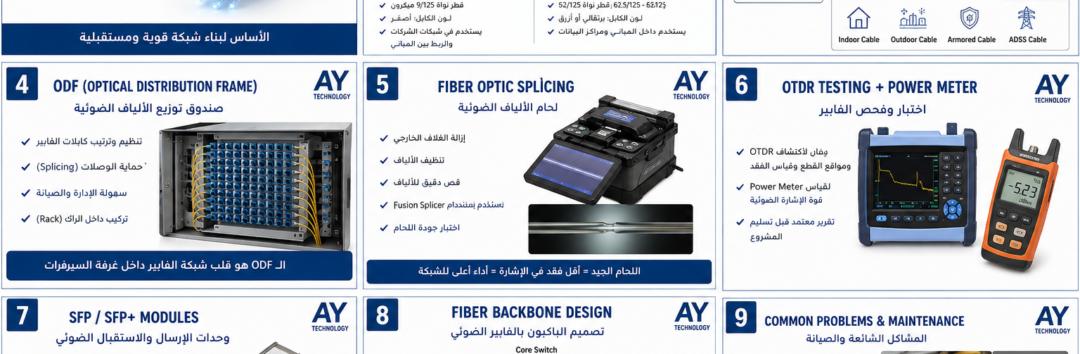
An optical distribution frame (ODF) organizes and terminates incoming fiber
cables. It provides structured connections to patch cords, SFP optics and network
equipment, simplifying maintenance and future expansion.
How to Connect Fiber to a Switch Using ODF and SFP?
For Fiber Backbone projects, the main cable should be terminated in an ODF for protection, fiber organization and documentation. Then use a Fiber Patch Cord to connect it to a compatible SFP/SFP+ port on the switch. The Fiber Patch Cord can connect directly to an SFP port without a Media Converter if the switch interface supports it. Terminate the cable in:Fiber ODFThen connect using:Fiber Patch Cordto:SFP Transceiver.
Professional Fiber Connection
Outdoor Fiber Cable
⬇
Fiber Splicing
⬇
ODF Panel
⬇
LC Fiber Patch Cord
⬇
SFP Module
⬇
Core Switch
Fiber ODF Panel Components
🔹 Adapter Plate
Houses LC or SC fiber adapters.
🔹 Fiber Pigtail
Fusion-spliced to individual fiber strands.
🔹 Splice Tray
Protects and organizes fiber splice points.
Organizing Fiber in a Network Rack
Proper fiber organization inside a network rack reduces faults and simplifies maintenance.
- Position the fiber ODF appropriately
- Use cable management for patch cords
- Label every fiber port
- Document fiber connections
- Allow room for future expansion
Need an ODF Installation or Rack Organization?
AY Technology provides ODF installation, fiber termination, rack organization and fiber testing for business projects.
📱 Request Fiber Infrastructure ServicesMore About Network Infrastructure
What Is Fiber Splicing and Why Does It Matter?
After cable installation, strands are joined to pigtails with a fusion splicer. Splice quality affects optical
loss, network stability and transmission performance.
Fiber Fusion Splicing Steps
1️⃣ Fiber Preparation
Strip the coating and clean the fiber before splicing.
2️⃣ Fiber Cleaving
Cleave the fiber accurately to minimize loss at the splice.
3️⃣ Fusion Splicing
Fuse the two fiber ends using a fusion splicer.
4️⃣ Protection Sleeve
Protect the splice with a heat-shrink sleeve.
Problems Caused by Poor Fiber Splicing
Small fiber termination errors can create significant network problems.
- ❌ High Fiber Loss
- Low optical signal power
- Fiber link outage
- SFP connectivity problems
- Slow connectivity between core switches
Professional Fiber Project Handover
- ✔ Fiber Cable Installation
- ✔ Fusion Splicing
- ✔ ODF Termination
- Label every fiber core
- ✔ Fiber Testing Report
- Document fiber links for future expansion
Need Professional Fiber Splicing?
AY Technology offers fiber splicing, ODF termination, testing and enterprise fiber installation for offices, hotels and industrial sites.
📱 Schedule a Fiber SpecialistRelated Articles
What Is OTDR Testing and Why Is It Important?
A working switch link alone is not
sufficient for fiber acceptance. OTDR testing evaluates the full optical path, including splices, connectors, attenuation and
breaks, producing evidence for project handover.
What Can an OTDR Detect?
📍 Fiber Distance
Estimate cable length and locate events along the route.
⚠ Splice Loss
Measure splice losses and identify poor joints.
🔍 Fiber Break Location
Locate breaks and faults in the fiber route.
📊 Loss Report
Produce a test report before project handover.
OTDR vs Optical Power Meter
An optical power meter measures received optical power. An OTDR evaluates
events and faults along the full fiber route.
| Tool | Function |
|---|---|
| OTDR | Analyze fiber routes and faults |
| Power Meter | Measure the final optical power |
Professional Fiber Project Handover
- ✔ OTDR Test Report
- ✔ Fiber Core Mapping
- ✔ ODF Labeling
- ✔ Connection Documentation
- ✔ Network Diagram
- ✔ Future Expansion Plan
Need Fiber Testing or Certification?
AY Technology provides OTDR testing, troubleshooting, splicing and infrastructure documentation.
📱 Request an OTDR TestExplore More Infrastructure Topics
What Is an SFP Module and What Does It Do?
An SFP (Small Form-factor Pluggable) transceiver connects fiber infrastructure to network equipment such
as core switches, routers and firewalls, providing an optical uplink.
Connecting Fiber to a Core Switch Correctly
Fiber Cable
⬇
ODF Panel
⬇
Fiber Patch Cord LC
⬇
SFP / SFP+ Module
⬇
Layer 3 Core Switch
This design supports high-speed backbone links between network rooms and switches.
SFP vs SFP+: Understanding the Difference
| Type | Speed | Usage |
|---|---|---|
| SFP | 1Gbps | Small / Medium Networks |
| SFP+ | 10Gbps | Core Network / Data Center |
How to Choose the Right SFP Module
- Select optics that match the switch port speed
- Check single-mode versus multimode compatibility
- Select the required reach, such as 300 m, 10 km or 40 km
- Check SFP compatibility with the switch vendor
- Confirm connector type, such as LC or SC
Common SFP Fiber Connectivity Problems
- Incompatible single-mode SFP and multimode cable
- Mismatched SFP speeds at the link ends
- Weak optical signal caused by a poor splice
- Transceiver is incompatible with the switch
- Defective patch cord or dirty connector
Need a Professional Fiber Backbone?
We design fiber backbones, integrate core switches, select optics and test the network.
📱 Contact a Network EngineerRelated Articles
Common Fiber Optic Network Faults and Diagnosis
Fiber networks are reliable when properly designed and installed, but faults can still disrupt operations. Troubleshooting should cover cabling,
ODF termination, splices, SFP optics and core switch interfaces, rather than relying on hardware replacement alone.
Frequent Causes of Fiber Optic Faults
⚠ High Fiber Loss
High optical loss due to poor splices or dirty connectors.
⚠ Fiber Link Down
Switch-to-switch outages caused by cable damage or SFP faults.
⚠ Wrong SFP Module
SFP optics incompatible with the cable type or port speed.
⚠ Poor Cable Management
Excessive fiber bending can increase attenuation.
Steps to Diagnose a Fiber Network Problem
- Check SFP status and diagnostics at the switch
- Inspect the fiber patch cord
- Clean LC and SC connectors
- Measure optical power
- Run OTDR testing to locate faults
- Inspect splice points in the ODF
How to Reduce Fiber Infrastructure Faults
- Use fiber cable specified for the site
- Perform professional fusion splicing
- Label each fiber core
- Use an ODF in the rack
- Document the fiber route
- Retain the OTDR test reports
Experiencing a Fiber Network Issue?
AY Technology offers fiber fault diagnosis, OTDR testing, repair and network optimization for businesses and factories.
📱 Request Fiber Network DiagnosticsFurther Reading on Network Troubleshooting
Summary: Designing a Professional Fiber Optic Network
Professional fiber network design involves more than running cable between two points. Planning, ODF termination, splicing, OTDR testing, optics and core switch integration work
together to create a resilient and scalable backbone for business systems.
Typical Enterprise Fiber Network Architecture
Internet
⬇
Firewall
⬇
Layer 3 Core Switch
⬇
SFP+ Fiber Connection
⬇
ODF Fiber Panel
⬇
Fiber Backbone
⬇
Access Switches
⬇
Users - CCTV - WiFi - VoIP
Fiber Optic Network FAQ
Is Fiber Faster Than Cat6 Cabling?
Fiber supports high bandwidth over longer distances and is often used as a network backbone.
Does Every Business Need Fiber Optics?
Not always. Fiber is particularly useful between buildings, at longer distances or where higher bandwidth is required.
What's the Difference Between Single-Mode and Multimode Fiber?
Single-mode fiber generally supports longer links, while multimode is common for shorter data center connections.
Should You Perform an OTDR Test After Installation?
Yes. OTDR testing can reveal faults and help validate installation quality before handover.
Fiber Optic Solutions from AY Technology
AY Technology provides IT infrastructure and fiber optic services from design through installation and testing.
- ✔ Fiber Optic Network Design
- ✔ Fiber Cable Installation
- ✔ ODF Installation
- ✔ Fusion Splicing
- ✔ OTDR Testing
- ✔ SFP Configuration
- ✔ Core Switch Integration
- ✔ Network Documentation
FIBER OPTIC • ODF • OTDR • HANDOVER
What Should You Receive After a Fiber Backbone Installation?
Supplying fiber cable and completing the splices alone is not enough to close out a project. Request route designs, a fiber schedule and reviewable test reports before final commissioning.
Fiber Route and Core Plan
ODF-to-ODF diagram, core and port numbers, spare fiber count, and Single Mode or Multi Mode specifications.
OLTS and OTDR Test Reports
Insertion Loss and OTDR reports within the project scope and agreed standards, with test direction, lengths and events documented.
SFP and Final Commissioning
Match Fiber Type, Connector and Optical Budget to the SFP/SFP+ transceivers, and document Uplink Speed, Patch Mapping and As-Built records.
Send the distances, number of buildings, required core count and uplink details for the design and BOQ.
FIBER OPTIC • ODF • OTDR • HANDOVER
Fiber backbone acceptance and handover checklist
Cable installation and splicing alone do not complete a fiber project. Require core mapping, test reports and documented commissioning.
Fiber route and core schedule
Map ODF-to-ODF links, numbered cores, patch ports, spare fibers and single-mode or multimode specifications.
OLTS and OTDR evidence
Collect insertion-loss and OTDR results as specified, identifying test direction, wavelengths, link length and events.
Optics and network links
Check SFP/SFP+ compatibility, optical budget, connector types and uplink speed; hand over patch schedules and as-built drawings.
Share distances, building count, core requirements and desired uplinks for a fiber design and BOQ.
Need Fiber Optic Infrastructure for Your Business?
Request professional design and installation of
fiber cabling, ODF, splicing, OTDR, SFP optics and core networking.
📚 Enterprise Infrastructure Guides
Prepared by AY Technology Infrastructure Team