
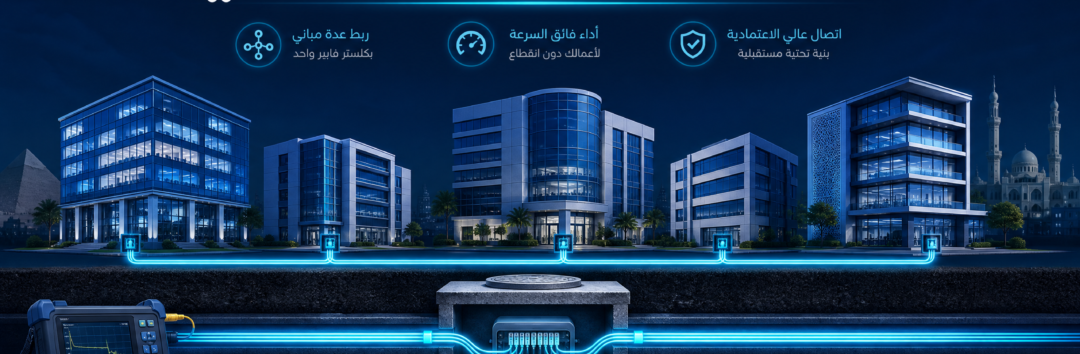
Enterprise Optical Networks • Multi-Building Projects • Egypt
OSILAN Fiber Optic Backbone: Design and Installation Between Buildings
A fibre cluster connects several buildings through an engineered optical backbone. In residential compounds, hotels, hospitals, factories or campuses, good infrastructure depends on the physical cable route, compatible fibre components, termination, optical loss budget and documented acceptance testing.
Request a Fibre Backbone Study Explore OSILAN SolutionsWhen Do You Need Fibre Between Buildings?
An optical backbone is commonly considered when several buildings must share enterprise networking, Wi-Fi, CCTV, telephony or IPTV services. Fibre offers appropriate long-distance connectivity and electrical isolation; exact achievable distances and speeds depend on compatible equipment and optical link budgets.
Hotels & Resorts
Link a central equipment room to remote blocks carrying guest Wi-Fi, security cameras, IP phones and suitable hospitality TV traffic.
Residential Compounds
Connect buildings, shared facilities, gates and security monitoring areas to the estate’s backbone.
Hospitals & Universities
Support campus buildings, department networks and suitable core/distribution switching.
Industrial Sites
Provide appropriate protected optical links between production facilities, warehouses and operational control areas.
What OSILAN Components May Be Included?
Fibre-optic infrastructure can use suitable OSILAN or other approved components, selected according to the project specification and compatibility. Do not decide the optical architecture on product branding alone.
- Single-mode or multimode cable: Match optical category and cable construction to distance, environment and equipment.
- Optical Distribution Frames (ODFs): Organize and protect terminated fibre cores at equipment rooms and distribution points.
- Pigtails and compatible connectors: Use appropriate LC, SC and APC or UPC termination styles and identify each fibre core clearly.
- Splice closures and trays: Protect joints at required points along the route.
- Patch panels, racks and cable management: Ensure convenient and safe operation and maintenance.
- Optical transceivers: Select SFP/SFP+ or other modules that match link reach, wavelength, speed, switch support and fibre type.
Designing the Civil Infrastructure and Cable Route
The backbone begins with a physical survey. Site-specific civil requirements, available ducts and potential future access can strongly affect installation and long-term maintenance.
Duct Banks and Conduits
Plan the route, duct capacity, cable protection, separation from other utilities and suitable entry points into buildings.
Handholes and Pulling Access
Provide access for pulling and future maintenance at appropriate locations, according to the route, pulling forces and civil requirements.
Risers and Equipment Rooms
Coordinate ODF mounting, slack management, firestopping, pathways and technician access with other building trades.
Spare Capacity and Expansion
Allow appropriate spare fibres and duct space based on the project’s expected future growth and support requirements.
Single-Mode vs Multimode Fibre for a Building Cluster
| Design factor | Single-mode OS2 | Multimode OM3 / OM4 |
|---|---|---|
| Typical use | Longer campus and inter-building links | Shorter compatible premises or data-centre links |
| Optical equipment | Compatible single-mode transceivers | Compatible multimode transceivers |
| Reach | Often suitable for longer distances with the right optics | Generally lower link reach at comparable high-speed applications |
| Planning priority | Distance, future speeds, fibre cores and optical budget | Application-specific distance and optics compatibility |
Step-by-Step Fibre Cluster Design
- Requirements: List all buildings, networking services, distances, existing routes and bandwidth expectations.
- Topology: Choose an appropriate star, ring or other distribution arrangement, with redundant links where justified.
- Optical cable specification: Select single-mode or multimode, core count, cable protection, and indoor or outdoor construction.
- Route and civil design: Confirm duct bank, handhole, pulling and riser requirements with site conditions.
- Loss budget: Calculate fibre attenuation, expected connector and splice losses, and a suitable engineering margin against selected transceiver specifications.
- ODF and termination: Plan racks, patching, splice closures, labelled ports and fibre-core allocations.
- Installation and testing: Complete the approved installation and the specified end-to-end loss and OTDR checks.
- Handover: Deliver route and fibre-core documentation, test results, relevant equipment details and agreed support arrangements.
Fusion Splicing, OTDR and Acceptance Testing
Fusion splicing joins prepared optical fibres using an appropriate splicer and protective accessories. Poor cleaves, contamination and tight bends may cause significant optical loss. Organize and label splice locations for later maintenance.
An OTDR can help locate events and faults along a fibre run. However, OTDR traces are not a complete replacement for the end-to-end insertion-loss measurements required by many project specifications. Appropriate test methods, wavelengths, reference arrangements and acceptance thresholds should be agreed before installation.
Common Errors in Fibre Backbone Projects
- Installing cable without confirming the site route or civil protection requirements.
- Choosing insufficient fibre-core capacity or no allowance for maintenance and growth.
- Using incompatible SFP optics, wavelength, connectors or fibre types.
- Ignoring optical loss caused by splices, patch connectors and cable attenuation.
- Exceeding cable pulling-force or bend-radius limits.
- Leaving ODF ports and fibre cores without clear identification.
- Commissioning without as-built drawings and required acceptance-test records.
What Determines Fibre Cluster Project Cost in Egypt?
Pricing depends on the route lengths, civil excavation or duct reuse, cable category and core count, number of buildings, splice points, ODF capacity, equipment-room requirements, testing and overall site access. The exact budget should follow a survey and approved equipment schedule rather than a generic price per metre.
Frequently Asked Questions
Can I connect IP cameras directly to a fibre cable?
Fibre commonly connects compatible switches, optical devices or media converters; standard camera PoE still requires appropriate local power distribution. Some specialized cameras or devices have compatible optical interfaces.
How many fibres should a residential compound install?
The answer depends on the number of buildings, topology, required services, redundancy and expansion. Define a fibre-core schedule for the actual project rather than prescribing the same count everywhere.
Do I need both OTDR and optical power testing?
Many engineered links benefit from both fault/event characterization and end-to-end loss verification, but the exact acceptance testing should follow the project’s defined scope and standards.
Is OS2 fibre always better than OM4?
No. The suitable choice depends on distance, link application, optics and installed infrastructure. OS2 is common for longer campus links while OM4 can be appropriate for certain shorter connections.
Does AY Technology handle installation and commissioning?
AY Technology can discuss a project scope for fibre infrastructure design, installation, splicing, ODF termination, optical testing and commissioning, subject to the agreed technical and commercial requirements.
Need a Fibre Backbone for a Compound, Hotel or Campus?
Send the site drawings, locations and approximate distances between buildings, number of required network links, planned services and any existing underground duct information. AY Technology can review the route and prepare a suitable proposal.
Request a Fibre Project Quotation Read the Fibre Design Guide WhatsApp Engineeringتأسيس كلستر فايبر للمباني في مصر: دليل OSILAN الشامل 2026 Fiber Optic Backbone Guide — من تصميم شبكة الفايبر بين المباني حتى اللحام والاختبار OTDR ومتطلبات التنفيذ والتكلفة
عندما يتجاوز المشروع نطاق مبنى واحد — مجمع سكني أو جامعة أو مستشفى أو فندق أو مصنع — تصبح شبكة الفايبر أوبتيك (Fiber Optic Backbone) أحد أهم عناصر الربط بين المباني. يمكن تنفيذها بكابلات ومكونات من علامات متخصصة مثل OSILAN البريطانية، مع اختيار الكابلات والـODF والـPatch Panels والـRacks حسب متطلبات المشروع، وليس اسم العلامة التجارية وحده.
في هذا الدليل من AY Technology نشرح خطوات تصميم وتنفيذ كلستر الفايبر (Fiber Cluster): دراسة المسارات المدنية وDuct Banks، اختيار Single Mode أو Multi Mode وعدد الألياف، تجهيز ODF واللحامات، ثم إجراء اختبارات القبول المناسبة مثل Insertion Loss andOTDR بحسب طول الرابط ونطاق العقد، مع توضيح العوامل التي تحدد تكلفة التنفيذ.
What Will You Learn in This Guide?
- متى تحتاج شبكة فايبر بين المباني؟
- الفرق بين Single Mode وMulti Mode ومتى تستخدم كل نوع.
- ما هي منتجات OSILAN واستخدامها في شبكات Fiber Optic؟
- تصميم مسارات الفايبر: Duct Banks وHandholes وتخطيط التصريف وفق الموقع.
- لحام الفايبر (Fusion Splicing) وأجهزة القياس.
- اختبار OTDR وقراءة النتائج.
- العوامل المؤثرة في تكلفة تنفيذ الفايبر في مصر.
- الأسئلة الشائعة (FAQ) مع إجابات خبراء.
متى تحتاج شبكة فايبر بين المباني؟
is used Fiber Optic Backbone عند الحاجة إلى الربط بين مبانٍ متباعدة أو نقل بيانات عالية السعة مع عزل كهربائي مناسب. روابط النحاس الهيكلية المعتادة تُصمم عادةً لقناة تصل إلى 100 متر، منها 90 مترًا للـPermanent Link، بينما تعتمد مسافة الفايبر على نوع الليف والـTransceiver والميزانية الضوئية (Optical Budget). مثلًا قد يدعم OM4 روابط 10GBASE-SR حتى 400 متر مع وحدات مناسبة، لكن OS2 Single Mode لا يضمن مسافة 80 أو 100 كم دون اختيار Optics محدد وحساب الفقد.
ما هي منتجات OSILAN وما علاقتها بشبكة Fiber Backbone؟
OSILAN هي علامة تجارية تابعة لشركة Osilan Ltd المسجلة في المملكة المتحدة، وتقدم حلول Structured Cabling من كابلات النحاس والفايبر ومكونات التوصيل والخزائن والـRacks. OSILAN ليست اختصارًا لـEgyptian Optical Surface LAN وليست نظامًا للحفر. أما أعمال Trenches وDucts وHandholes/Manholes فهي جزء من التصميم المدني لمسارات الكابلات، وتُنفَّذ وفق مخططات الخدمات والأحمال والاشتراطات المعتمدة بالموقع.
مكونات البنية المدنية ومسارات الفايبر والكابلات
- مسارات مواسير وDuct Banks بعمق يحدده التصميم المدني واشتراطات الموقع، لا رقم ثابت.
- غرف سحب وتفتيش Handholes/Manholes في مواقع مدروسة حسب طول السحب والشد والتفرعات واحتياجات الصيانة.
- ممرات فرعية لكل مبنى (Branch Trenches).
- دعامات الكابلات داخل الممرات (Cable Ladders).
- أنابيب حماية داخلية (PVC/HDPE) للفايبر.
- أغطية معدنية قابلة للفتح.
الميزة الرئيسية للتصميم المدني الجيد هي إتاحة التوسعات والصيانة دون إعادة أعمال الحفر قدر الإمكان، وذلك بتخصيص مسارات احتياطية ومواسير مناسبة وسجلات واضحة لنقاط السحب. يجب مراعاة الفصل والحماية المطلوبة لمسارات الكهرباء والاتصالات؛ ولا يُسمح بافتراض أن جميع الخدمات يمكن وضعها في نفس الماسورة أو الخندق دون تصميم معتمد.
تصميم كلستر فايبر: الخطوات الهندسية
يبدأ تصميم Backbone بتحديد غرف الاتصالات الرئيسية MDF والتوزيع IDF، ثم دراسة المسارات والأطوال والتعارض مع خدمات الموقع، ونقاط السحب والتفرعات، واختيار OS2 أو OM4 حسب المسافات والسرعات. يُحدد عدد الألياف (Core Count) وفق الروابط المطلوبة وسيناريوهات التوسع والاحتياطي والتكرار، ثم يُراجع Optical Budget وتوثق مسارات الـODF والـSplice Trays وخطة الاختبارات قبل التوريد.
لحام الفايبر والاختبار OTDR
بعد سحب الفايبر في الممرات، يأتي دور لحام الألياف (Fusion Splicing) بجهاز متخصص يذيب طرفي الليف ويلصقهما بدقة ميكرونية — يُراجع فاقد كل لحام وفق مواصفات المشروع ونتائج الاختبار الفعلية، ولا يصح اعتبار رقم واحد حدًا مقبولًا لكل أنواع المسارات. بعد اللحام، يُستخدم OTDR عند الحاجة لتحليل المسار وتحديد مواقع الوصلات والأعطال، بينما يُقاس Insertion Loss للوصلة باستخدام Light Source & Optical Power Meter وفق خطة قبول واضحة. يُسلَّم تقرير الاختبارات المناسب لنطاق التنفيذ، مع توثيق مسارات الألياف ونتائج القياس.
استلام شبكة الفايبر يتطلب خطة اختبارات وقبول موثقة، تشمل قياس فقد الوصلات باستخدام Light Source وOptical Power Meter عند الحاجة إلى تقييم Insertion Loss، واستخدام OTDR عندما تدعو الحاجة إلى توثيق اللحامات أو تحديد مواقع الأعطال ووفق متطلبات العقد وطول الرابط. يُسلَّم العميل تقرير يناسب نطاق المشروع، مع تسمية الألياف وحفظ نتائج القياس والمخططات.
الأخطاء الشائعة في مشاريع الفايبر
- ❌ اختيار فايبر داخلي للممرات الخارجية (يتلف بالماء والحرارة).
- ❌ عدد ألياف قليل — التوسع المستقبلي يستلزم حفر جديد.
- ❌ عدم إجراء اختبارات Insertion Loss المناسبة أو توثيق نتائج OTDR عند الحاجة.
- ❌ تجاهل متطلبات الفصل والحماية ومخططات الخدمات عند تمرير كابلات الاتصالات قرب القدرة الكهربية.
- ❌ تنفيذ مسارات سحب دون مراعاة نقاط الوصول ونصف قطر الانحناء وقوة الشد المسموحة.
- ❌ تجاوز قوة السحب المسموح بها أو ثني الكابل بنصف قطر أصغر من المسموح وفق بيانات المصنّع.
- ❌ عدم تسمية الألياف في لوحات الـPatch Panel.
Frequently Asked Questions (FAQ)
ما الفرق بين Single Mode وMulti Mode؟
Multi Mode OM3/OM4 مناسب لروابط أقصر مع وحدات بصرية متوافقة، وقد يصل OM4 إلى 400 متر في 10GBASE-SR وفق مواصفات الـTransceiver. أما Single Mode OS2 فيستخدم لربط مسافات أطول، لكن مدى الرابط يتحدد بسرعة النقل، وطول الموجة، وقدرة الإرسال وحساسية الاستقبال، وفقد الكابل واللحامات والكونكتورات، وليس رقم 80 كم ثابتًا. للمباني المتباعدة يُفضَّل حساب Optical Link Budget قبل اعتماد المكونات.
هل يمكن تشغيل كاميرات على الفايبر مباشرة؟
يمكن ربط أنظمة كاميرات IP عبر الفايبر باستخدام سويتشات تدعم SFP أو Media Converters مناسبة. الفايبر ينقل البيانات لكنه لا يغذي كاميرات PoE بالطاقة مباشرة؛ لذلك يجب توفير سويتش PoE أو مصدر طاقة محلي آمن قرب الكاميرات. يُختار التصميم وفق المسافة وعدد الكاميرات والبيئة وحماية المعدات.
كم ليفًا أنصح به لمشروع مجمع سكني؟
لا يوجد حد أدنى ثابت مثل 12 أو 24 ليفًا يصلح لكل المجمعات. يعتمد Core Count على عدد المباني ونقاط الربط النشطة والاحتياطية، ومواقع التوزيع وخطط التوسع ومتطلبات Redundancy. قد يكون اختيار كابل بعدد ألياف أكبر اقتصاديًا مقارنة بإعادة سحب مسار لاحقًا، لكن القرار يحتاج حسابًا فنيًا ومقارنة تكلفة حقيقية، وليس مضاعف تكلفة ثابتًا.
Conclusion
نجاح Fiber Optic Backbone بين المباني يعتمد على مسارات حماية منظمة، وكابلات مناسبة للبيئة، وODF وFusion Splicing منضبطين، واختبارات قبول موثقة باستخدام Light Source/Power Meter وOTDR حيث يلزم. يمكن اختيار منتجات OSILAN أو غيرها بحسب المواصفات والاعتماد المطلوب وتوافر المكونات، مع توثيق الربط لتسهيل التشغيل والصيانة.
Also Read from AY Technology
Fiber Backbone — ODF / Splicing / OTDR
Plan, test and hand over a building fiber backbone
Multi-building fiber projects require protected routes, capacity planning and documented testing for every core—not just purchasing cable.
Route design
Define ducts, ODF locations, manholes, link distances and expansion fibers between buildings.
Fiber and termination
Select single-mode or multimode fiber by design requirements; specify trays, pigtails, patch cords and fiber labeling.
Testing and documentation
Perform insertion-loss and OTDR testing as scoped, then deliver as-built drawings, labels and reports.
Send the site layout, distances, building count, connection points and expected capacity.
نفذ كلستر الفايبر لمشروعك مع AY Technology
نراجع مخططات الموقع ومسارات الربط بين المباني، ثم نحدد احتياجات الكابلات وعدد الألياف وODF واللحامات ووسائل الاختبار المناسبة. يمكن إدراج منتجات OSILAN ضمن العرض الفني حين تتوافق مع المواصفات المطلوبة وتوافر المكونات. تُحدد متطلبات المعاينة والاختبار والتسليم حسب طبيعة المشروع.
📧 info@aytechnology.org
الأسعار تختلف حسب الموقع والمواصفات وحجم المشروع — تواصل معنا لعرض سعر مخصص ومجاني
Request a Quoteواتساب: 01551226666أو اتصل: 01111106218 / 01200077165 — تُحدد المعاينة ومدة إعداد العرض وفق موقع المشروع ونطاقه